





Software, by recipe
Read it, then trust it.
Recipe downloads, builds, installs and cleans up software. Every program has a recipe: a short file you can read before anything runs. LevitateOS and AcornOS use the same Recipe.
Get Recipe on another Linux
curl -fsSL https://levitateos.org/recipe/install.sh | shOn LevitateOS, Recipe is already part of the system.
The four steps
One button, or one step at a time.
Install runs all four, and skips what is already done. Each step also works alone: download now, build later, clean up when you choose.
-
1
Download
Fetches what the recipe names and checks each file against the SHA-256 the recipe pins.
-
2
Build
Compiles, when there is something to compile. Many recipes have nothing to compile and show no build step.
-
3
Install
Puts the program in place: for your own account, or for everyone on the computer.
-
4
Clean up
Removes the download and the build. Only the installed program stays.
Your disk
Nothing is left behind.
A program that needs gigabytes to build takes megabytes once it is installed. Recipe gives the rest back, and it shows you everything it holds.
In development. Written, not built or run yet.
- After an install
- Only the installed program and its receipt remain.
- Keeping the rest
- Your choice, for people who rebuild often. It is off unless you turn it on.
- Removing a program
- Frees its space at once. No old versions are kept.
- Storage
- One page lists everything Recipe holds, each kind with its size and a way to remove it.
Start with the software
Find what you want to run.
Search by name or browse by kind of software. Each entry leads to the recipe behind the program, so finding it and understanding it happen in the same place.
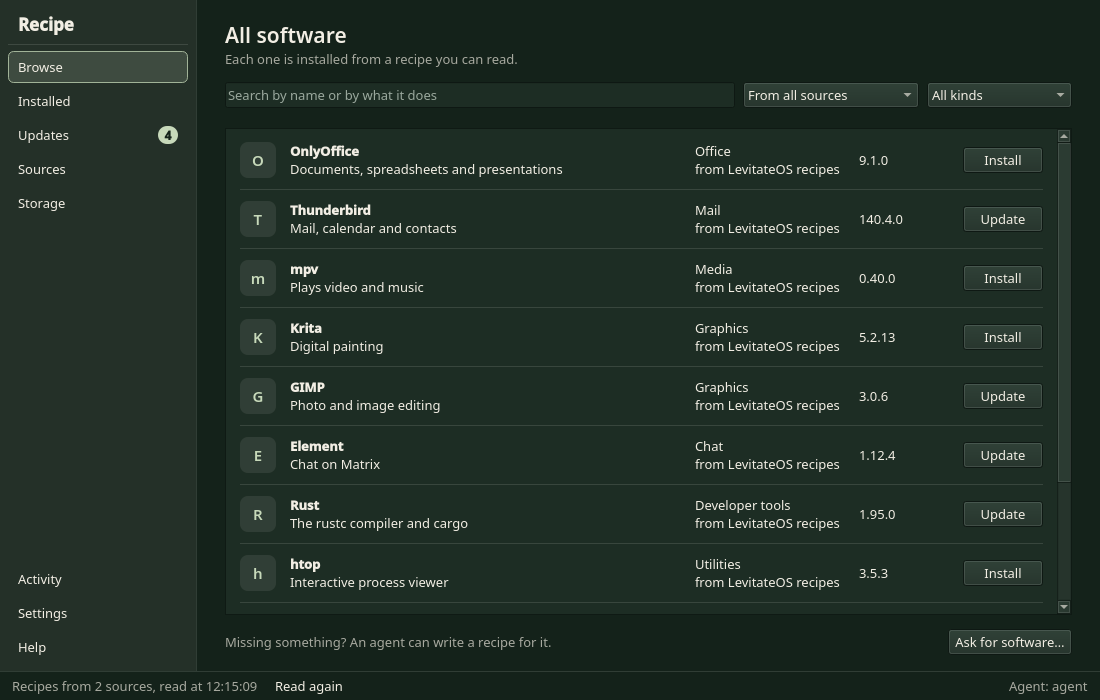
Development previews; application content uses sample data.
Before you install
Know what will change.
Choosing Install brings you to the decision, before the work starts. Recipe shows where the software will go and what it may use along the way.
- Choose software for your own account or for the whole computer.
- Review the network hosts, files and resources the recipe may use.
- Recipe runs it within those declared limits.
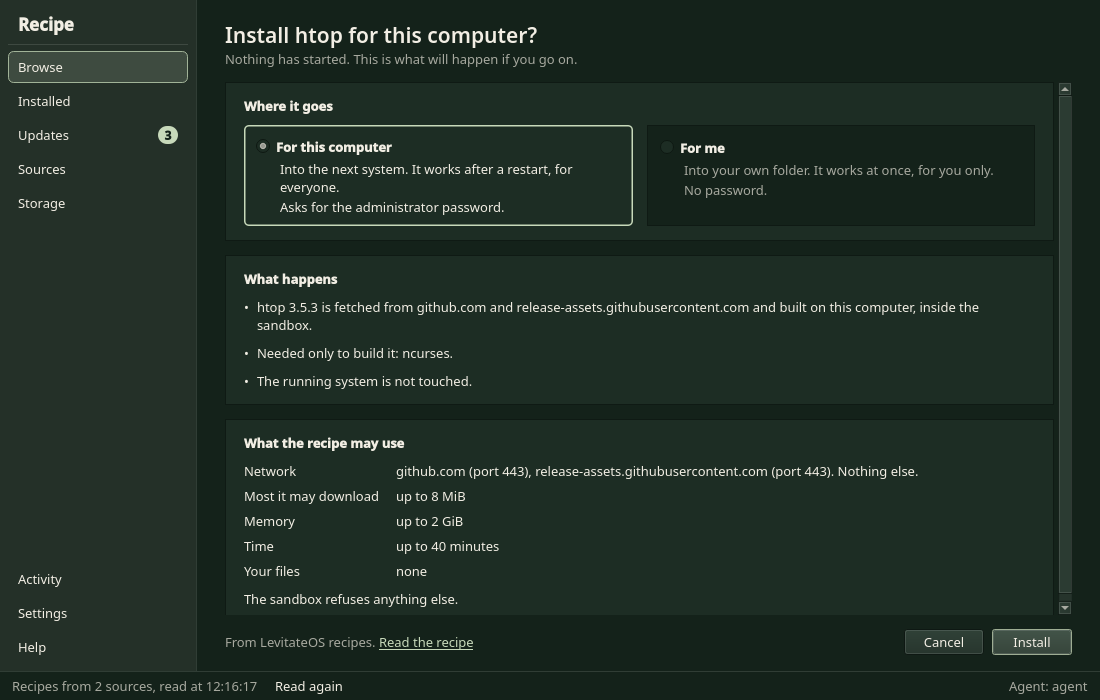
For me, or for everyone
Choose where it goes.
Software can be for your own account or for the whole computer. "For me" is the default.
- For me goes into your own store,
~/.local/share/recipe. Other people on the computer do not see it. - For everyone is system software. On an A/B installation it is written into the other root, which is unlocked. The booted root is never touched. It becomes active when that root is started.
- A mutable installation has one root and no recab. System software goes straight into the running system.
# for me: your own account, no administrator needed
recipe install ripgrep

# for everyone: the whole computer, as administrator
sudo recipe --system install ripgrep
If you make the other root a copy of the booted root again, the system changes Recipe wrote there are gone. Recipe notices, and writes exactly that system part again. It does not redo the whole install, and it does not touch what you installed for yourself. Until that has succeeded, it does not report the part as done.
The software that comes with the system is installed this way too. The system image holds only the minimal base. The desktop, Firefox, audio, networking, Bluetooth, printing, the firewall and fonts are group recipes, and the installer installs each system's default set from a package cache on the install medium. Each group has a Recipe receipt, so you can remove or swap it in Recipe, the desktop included. Removing the last desktop is allowed and leaves a text login.
Where recipes come from
Sources, yours included.
A source is a collection of recipes. The system ships the official one, so its recipes install offline. You can add others: a repository on github.com or gitlab.com, or a folder on your own disk.
- A remote source publishes an index. Recipe keeps the index and downloads a recipe's files only when you install it.
- Every downloaded file is checked against the SHA-256 in the index. A file that differs stops the install before anything runs.
- A folder you point Recipe at is read as it is, edits included.
recipe source add https://github.com/OWNER/recipes    # a repository of recipes
recipe source add --path ~/my-recipes                 # a folder of your own
recipe source list
recipe install SOURCE:NAME                            # name the source when two have the same recipe
The recipe
A recipe states facts.
What the program is, where it comes from, what goes where. Recipe does the downloading, checking, unpacking and placing. A recipe has code only for what is unusual. Put your own in a folder, add that folder as a source, and Recipe reads it like any other.
const RECIPE_API = 1;
const NEEDS = #{
    outputs: #{ "package": "directory" },
    network: ["github.com:443", "release-assets.githubusercontent.com:443"],
    network_max_bytes: 8388608,
    timeout_secs: 300,
};

const PACKAGE = #{
    name: "ripgrep",
    version: "15.2.0",
    description: "Fast recursive text search with rg",
};

const SOURCES = #{
    release: #{
        url: "https://github.com/BurntSushi/ripgrep/releases/download/15.2.0/ripgrep-15.2.0-x86_64-unknown-linux-musl.tar.gz",
        sha256: "33e15bcf1624b25cdd2a55813a47a2f95dbe126268203e76aa6a585d1e7b149c",
    },
};

const FILES = [
    ["rg",          "bin/rg", 0o755],
    ["doc/rg.1",    "share/man/man1/rg.1"],
    ["COPYING",     "share/licenses/ripgrep/COPYING"],
    ["LICENSE-MIT", "share/licenses/ripgrep/LICENSE-MIT"],
    ["UNLICENSE",   "share/licenses/ripgrep/UNLICENSE"],
];

const UPSTREAM = #{ github: "BurntSushi/ripgrep" };- 01 Line 9: PACKAGE: what it is, and which version this recipe installs.
- 02 Line 15: SOURCES: where it comes from, pinned by checksum. Nothing else is downloaded.
- 03 Line 22: FILES: what goes where. No function is needed to copy files.
- 04 Line 30: UPSTREAM: where the newest version can be found, so Recipe can tell you about it.
Updates
Updates happen when you ask.
Recipe looks for newer versions only when you tell it to, and it updates one program at a time. It never changes a recipe.
Update
The recipe you have fetched names a newer version than the one installed. One press installs that version.
Newer upstream
The program's authors have released something the recipe does not name yet. Recipe tells you. The recipe has to be updated first, by hand or by an agent of your own.
Proprietary software
Your choice, and flagged.
Neither system ships proprietary software in its image. It reaches a machine only because you installed it through Recipe.
- A recipe for proprietary software says so in its
license, which starts withproprietary, and Recipe shows that flag. - The recipe fetches the program from the vendor's own site. Where the vendor's terms require it, we do not redistribute it.
- Being proprietary never earns an app a place in the base image, and it never bans it from Recipe.
- Steam is a recipe for LevitateOS only. It is fetched from Valve, and it needs 32-bit glibc libraries that AcornOS's musl base cannot run. The recipe is written and has not been run yet.
Only where it can run
An app is offered where its base can run it.
LevitateOS and its sibling run the same Recipe, not the same list of apps. LevitateOS uses glibc. A recipe can say which C libraries its build works with. Before it downloads anything, Recipe compares that with the system's.
- If they do not match, Recipe says what the build is linked against and what this system has, and stops.
- You can install it anyway with
--any-libc. The program may then not start. - A recipe whose package carries its own C library says so, and Recipe tells you it was tried on that library and not yet on yours.
Plainly
What Recipe does not do.
- It never asks an AI. When something fails, Recipe says what failed. Taking that to an agent of your own is your choice.
- It never updates by itself. Nothing is checked, downloaded or replaced until you ask.
- It keeps no old versions. A program is installed or it is not.
- It hides nothing it stores. If Recipe holds it, the Storage page shows it.
Ginux
Programs a recipe starts run in isolation.
Installing software means running someone else's build steps. Recipe puts a wall around the steps that start programs, and it lets you read, ahead of time, what is on the other side of it.
Your computer
Stays outside
- Your home folder
- Every host the recipe did not name
- Devices and raw network packets
- Listening sockets
The wall
Ginux
A userspace kernel that runs as an ordinary Linux process. It sits between a program and the host kernel. For each system call it answers it itself, performs a narrow checked operation, or denies it.
The domain
What the recipe gets
- The inputs it declared, read-only
- Its own work and output folders
- The hosts and ports it listed
- Memory, storage and time, each bounded
Which recipes run behind the wall
Recipe reads a recipe's source before anything runs and picks one of two ways. recipe info NAME tells you which, and why.
When the recipe can start a program
In a Ginux domain
Recipes that run commands, check out source with git, or build with make or cmake. Each dependency runs in its own domain, under its own grants.
When it can start none
On the host, confined by Recipe
Recipes that only download, check, unpack and copy. They reach only the run's own folders and the hosts they listed, and a filter refuses new programs.
The grants are data you can read
What a recipe may use is its NEEDS: literal data, with no helper calls and no variables.
- Read without running What it may use is on the page before it does anything.
- Enforced, not advised A recipe cannot add a host, a file or a larger limit to what it declared. You can narrow the grants when you install; nobody can widen them.
- What you read is what runs Downloads must carry the SHA-256 the recipe pins.
const NEEDS = #{
    inputs: #{ source: "directory" },
    outputs: #{ program: "file" },
    network: ["publisher.example:443"],
    memory_mib: 4096,
    timeout_secs: 3600,
};
What it does not do
- Ginux is not a virtual machine. Its own README says the host kernel stays trusted, and that it is a narrow research project.
- A recipe that runs on the host is held by Recipe's own checks, not by Ginux.
- A grant for an address does not tell apart two sites on the same address and port.
- The program you install runs with your rights once it is installed. Isolation covers its install, not its use.
- The descriptive notes in a recipe (ABOUT) are the author's words. Only NEEDS is enforced.
The wall makes what you read true. It does not make an untrusted recipe safe.
Other systems
Get Recipe on another Linux.
On LevitateOS nothing has to be installed: Recipe is part of the system. This section is for other x86_64 Linux systems, where the package is called recipe-pm and the command is recipe.
curl -fsSL https://levitateos.org/recipe/install.sh | shThe script looks at the system. It takes the native package where one exists: RPM for the Fedora, RHEL and openSUSE families, .deb for the Debian and Ubuntu families, APK for Alpine. Everywhere else it takes a tarball and installs it into /usr/local. It checks the SHA-256 of what it downloaded, and it asks for root only to install.
You can read the script before you run it.
curl -fsSLO https://levitateos.org/recipe/install.sh
less install.sh
sh install.sh
By hand, per system
The files are on the release page. SHA256SUMS there lists every file.
- Fedora, RHEL, openSUSE
sudo dnf install ./recipe-pm-0.2.0-1.x86_64.rpm- Debian, Ubuntu
sudo apt install ./recipe-pm_0.2.0-1_amd64.deb- Alpine
sudo apk add ./recipe-pm-0.2.0-r0.x86_64.apk- Arch family
- The AUR package
recipe-pm. - Void
- Build it with xbps-src from the
recipe-pmtemplate. It is proposed to void-packages and is not in the official repository. - Any other system
- Unpack
recipe-pm-0.2.0-x86_64.tar.zstand runsudo sh install.sh. It installs into/usr/local.uninstall.shremoves it.
The tarball holds the command line only. The window, recipe-gui, comes as its own package where the system's Qt allows it.
What it needs
- An x86_64 Linux system.
- A recent kernel. 6.10 or newer is what has been tried. Older ones are untried.
- On Ubuntu, AppArmor restricts unprivileged user namespaces. The package loads a profile for Recipe's sandbox when it installs.
- About 330 MB is downloaded the first time you install a program that is built or unpacked in the sandbox: the compiler image. It is downloaded once and kept in your cache.